
반응형
오늘의 구현 목표
- 마우스 호버 기능
- 타일 셀렉트 기능
- Orbit Camera 기본 구현
- 타일에 마우스를 올리고 클릭했을 시 해당 타일의 정보를 얻기 위한 마우스 호버 기능을 구현
- 레이캐스트를 이용하여 타일을 선택 할 수 있도록 하는 기능 구현
|
1
2
3
4
5
6
7
8
9
10
11
12
13
14
15
16
17
18
19
20
21
22
23
24
25
26
27
28
29
30
31
32
33
34
35
36
37
38
39
40
41
42
43
44
45
46
47
48
|
using UnityEngine;
public enum TileType
{
Buildable,
Path,
Blocked
}
public class GridTile : MonoBehaviour
{
[Header("Tile Info")]
public Vector2Int GridPos { get; private set; }
public TileType TileType { get; private set; }
[Header("Visual")]
public Color hoverColor = Color.yellow;
private Renderer _renderer;
private Color _originalColor;
private void Awake()
{
_renderer = GetComponent<Renderer>();
if (_renderer != null)
{
_originalColor = _renderer.material.color;
}
}
public void Init(Vector2Int gridPos, TileType tileType)
{
GridPos = gridPos;
TileType = tileType;
}
public void SetHighlight(bool active)
{
if (_renderer == null) return;
_renderer.material.color = active ? hoverColor : _originalColor;
}
public void OnSelected()
{
Debug.Log($"Tile Selected - GridPos: {GridPos}, Type: {TileType}, WorldPos: {transform.position}");
}
}
|
cs |
|
1
2
3
4
5
6
7
8
9
10
11
12
13
14
15
16
17
18
19
20
21
22
23
24
25
26
27
28
29
30
31
32
33
34
35
36
37
38
39
40
41
42
43
44
45
46
47
48
49
50
51
52
53
54
55
56
57
58
59
60
61
62
63
64
65
66
67
68
69
70
71
72
73
74
75
76
77
78
79
80
81
|
using UnityEngine;
using UnityEngine.InputSystem;
public class TileSelector : MonoBehaviour
{
[Header("Raycast Settings")]
public LayerMask tileLayerMask;
public float raycastDistance = 200f;
private Camera _mainCamera;
private GridTile _hoveredTile;
private void Awake()
{
_mainCamera = Camera.main;
if (_mainCamera == null)
{
Debug.LogError("Main Camera not found! 카메라에 'MainCamera' 태그가 붙어 있는지 확인하세요.");
}
}
private void Update()
{
if (_mainCamera == null) return;
HandleHover();
HandleClick();
}
private void HandleHover()
{
Vector2 mousePos = Vector2.zero;
if (Mouse.current != null)
{
mousePos = Mouse.current.position.ReadValue();
}
else
{
return;
}
Ray ray = _mainCamera.ScreenPointToRay(mousePos);
if (Physics.Raycast(ray, out RaycastHit hit, raycastDistance, tileLayerMask))
{
GridTile tile = hit.collider.GetComponent<GridTile>();
if (tile != _hoveredTile)
{
// 이전 타일 하이라이트 해제
if (_hoveredTile != null)
_hoveredTile.SetHighlight(false);
// 새 타일 하이라이트
_hoveredTile = tile;
if (_hoveredTile != null)
_hoveredTile.SetHighlight(true);
}
}
else
{
// 아무 것도 가리키지 않으면 하이라이트 제거
if (_hoveredTile != null)
{
_hoveredTile.SetHighlight(false);
_hoveredTile = null;
}
}
}
private void HandleClick()
{
if (Mouse.current == null) return;
if (Mouse.current.leftButton.wasPressedThisFrame && _hoveredTile != null)
{
_hoveredTile.OnSelected();
}
}
}
|
cs |
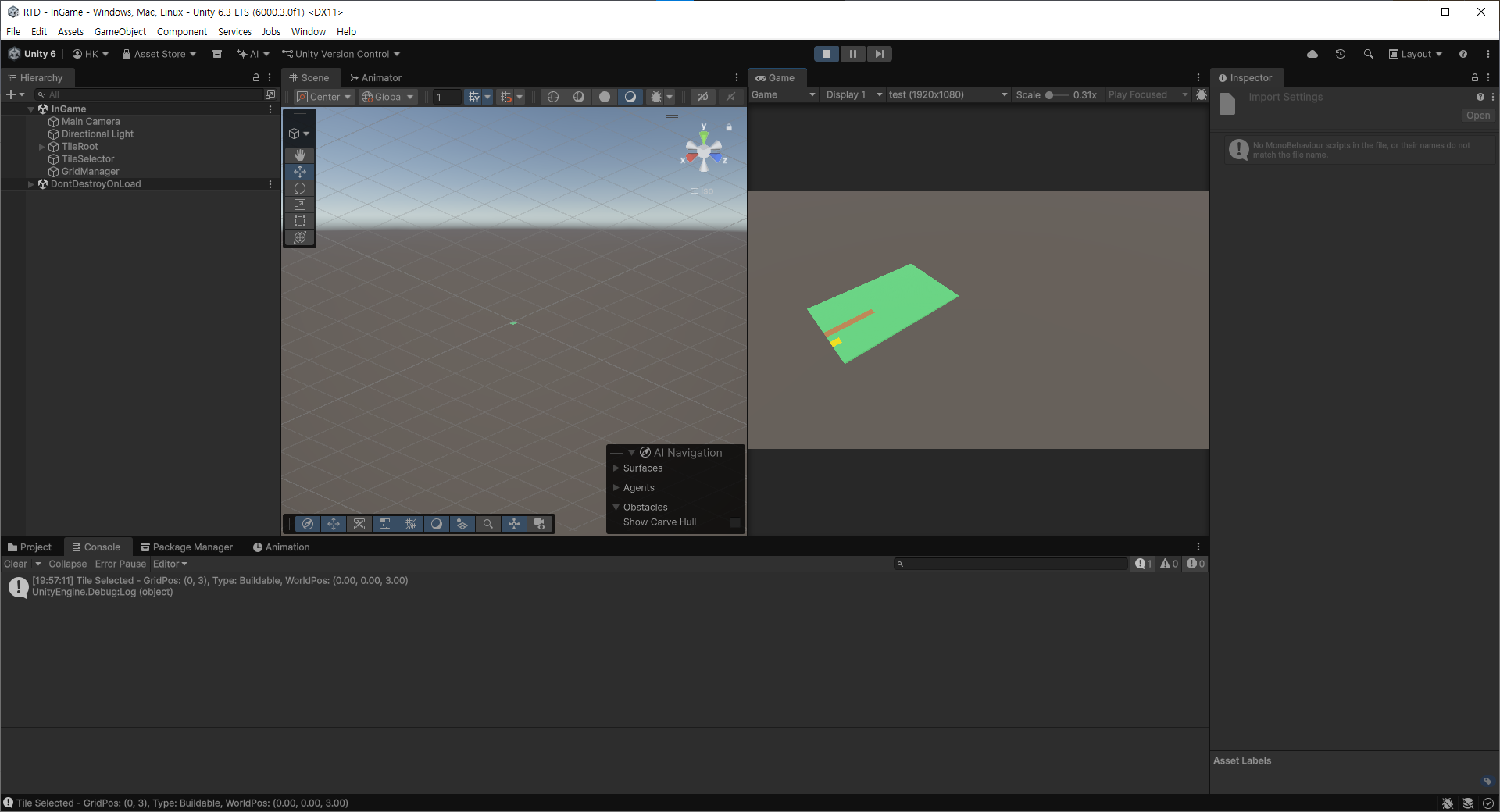
마우스를 타일에 올렸을 때 노란색이 보이도록 하였으며, 타일 밖으로 마우스가 나갈경우 호버가 되지않고 색상이 사라지도록 하였습니다.
또한 타일을 클릭 시 해당 타일이 어느 역할의 타일인지를 표기하도록 구현하였습니다.
- Orbit Camera 기본 구현
|
1
2
3
4
5
6
7
8
9
10
11
12
13
14
15
16
17
18
19
20
21
22
23
24
25
26
27
28
29
30
31
32
33
34
35
36
37
38
39
40
41
42
43
44
45
46
47
48
49
50
51
52
53
54
55
56
57
58
59
60
61
62
63
64
65
66
67
68
69
70
71
72
73
74
75
76
77
78
79
80
81
82
83
84
85
86
87
88
89
90
91
92
93
94
95
96
97
98
99
100
101
102
103
104
105
106
107
108
109
110
111
112
113
114
115
116
117
118
119
120
121
122
123
124
125
126
127
128
129
130
131
132
133
|
using UnityEngine;
using UnityEngine.InputSystem;
public class OrbitCamera : MonoBehaviour
{
[Header("Target")]
public Transform target; // 카메라가 바라볼 중심
public Vector3 targetOffset = new Vector3(0f, 0.5f, 0f);
[Header("Distance")]
public float distance = 15f;
public float minDistance = 5f;
public float maxDistance = 25f;
public float zoomSpeed = 5f;
[Header("Rotation")]
public float rotationSpeed = 150f;
public float minPitch = 20f;
public float maxPitch = 75f;
[Header("Panning")]
public float panSpeed = 10f;
private float _yaw = 45f;
private float _pitch = 45f;
private void Start()
{
if (target == null)
{
Debug.LogWarning("OrbitCamera: Target이 비었습니다. (0,0,0)에 임시 타겟을 생성합니다.");
GameObject temp = new GameObject("CameraTarget");
temp.transform.position = Vector3.zero;
target = temp.transform;
}
// 현재 카메라 위치 기준으로 초기 yaw/pitch 계산
Vector3 dir = transform.position - (target.position + targetOffset);
distance = dir.magnitude;
if (distance > 0.01f)
{
Vector3 dirNorm = dir.normalized;
_pitch = Mathf.Asin(dirNorm.y) * Mathf.Rad2Deg;
_yaw = Mathf.Atan2(dirNorm.x, dirNorm.z) * Mathf.Rad2Deg;
}
}
private void LateUpdate()
{
if (target == null) return;
HandleRotation();
HandleZoom();
HandlePan();
UpdateCameraPosition();
}
private void HandleRotation()
{
if (Mouse.current == null)
return;
if (Mouse.current.rightButton.isPressed)
{
Vector2 delta = Mouse.current.delta.ReadValue();
_yaw += delta.x * rotationSpeed * Time.deltaTime * 0.02f;
_pitch -= delta.y * rotationSpeed * Time.deltaTime * 0.02f;
_pitch = Mathf.Clamp(_pitch, minPitch, maxPitch);
}
}
private void HandleZoom()
{
if (Mouse.current == null)
return;
float scroll = Mouse.current.scroll.ReadValue().y;
if (Mathf.Abs(scroll) > 0.01f)
{
float zoomDelta = -scroll * zoomSpeed * Time.deltaTime * 0.1f;
distance = Mathf.Clamp(distance + zoomDelta, minDistance, maxDistance);
}
}
private void HandlePan()
{
Vector3 panDir = Vector3.zero;
if (Keyboard.current != null)
{
if (Keyboard.current.wKey.isPressed) panDir += Vector3.forward;
if (Keyboard.current.sKey.isPressed) panDir += Vector3.back;
if (Keyboard.current.aKey.isPressed) panDir += Vector3.left;
if (Keyboard.current.dKey.isPressed) panDir += Vector3.right;
}
if (Mouse.current != null && Mouse.current.middleButton.isPressed)
{
Vector2 delta = Mouse.current.delta.ReadValue();
Vector3 right = transform.right;
Vector3 forward = Vector3.ProjectOnPlane(transform.forward, Vector3.up).normalized;
panDir += (-right * delta.x + -forward * delta.y) * 0.01f;
}
if (panDir.sqrMagnitude > 0.0001f)
{
/*Vector3 pan = panDir.normalized * panSpeed * Time.deltaTime;*/
Vector3 dir = panDir;
if (dir.sqrMagnitude > 0.0001f) // normalized보다 직접 Normalize()가 효율적이라 위 코드에서 아래 코드로 변경
dir.Normalize();
Vector3 pan = dir * (panSpeed * Time.deltaTime);
pan.y = 0f;
target.position += pan;
}
}
private void UpdateCameraPosition()
{
Quaternion rot = Quaternion.Euler(_pitch, _yaw, 0f);
Vector3 offset = rot * new Vector3(0f, 0f, -distance);
transform.position = target.position + targetOffset + offset;
transform.LookAt(target.position + targetOffset);
}
}
|
cs |
반응형
'게임 개발 > 랜덤 타워 디펜스' 카테고리의 다른 글
| [랜덤 타워 디펜스] Day 6 타워 랜덤 생성 시스템 구현 (0) | 2025.12.27 |
|---|---|
| [랜덤 타워 디펜스] Day 5 타워 데이터 셋팅 및 합성 시스템 (0) | 2025.12.21 |
| [랜덤 타워 디펜스] Day 4 기초 UI 및 타워 건설 (0) | 2025.12.12 |
| [랜덤 타워 디펜스] Day 3 Waypoint 생성 및 몬스터 이동 구현 (0) | 2025.12.11 |
| [랜덤 타워 디펜스] Day 1 그리드 매니저 기본 설계 (0) | 2025.12.08 |
